Sustain
November 14, 2026
· 4 min read
One photo, seven covers: choosing a cover style
0:00 / 0:33
The cover is the first thing anyone sees of your album, and the same photo can make very different books. A cover style changes the whole cover in one click: how the photo sits, its colours, the frame around it and the title on top.
There are seven. Your photo and your title stay; only the look changes, and you can change it again at any time. When Sustain designs your album, the cover starts as Poster.
Pick a cover style
Open Themes
In the editor, press Themes in the toolbar on the left. The Themes panel opens with Cover style at the top.
Press a style
Each button is one style. Press one and the cover changes at once. The one in use is highlighted.

Save
Press Save. The album view, the shared link and everything you export use the saved cover.
The seven styles
Poster — the default. The photo fills the whole cover, with a bold title over a soft dark shade at the bottom.
Cinematic — dark bars at the top and bottom, warmer and deeper colours, darker corners, and a title in widely spaced capitals, like a film poster.
Editorial — the photo fills the cover, with a large serif title, like a magazine.
Polaroid — a warm, slightly faded photo on cream paper, with a handwritten title.
Minimal — a light background, a thin title and a lot of space.
Documentary — black and white, thin bars, and a title in typewriter capitals.
Default — your theme’s own cover: its background, its frame around the photo, its title font and the band behind the title.
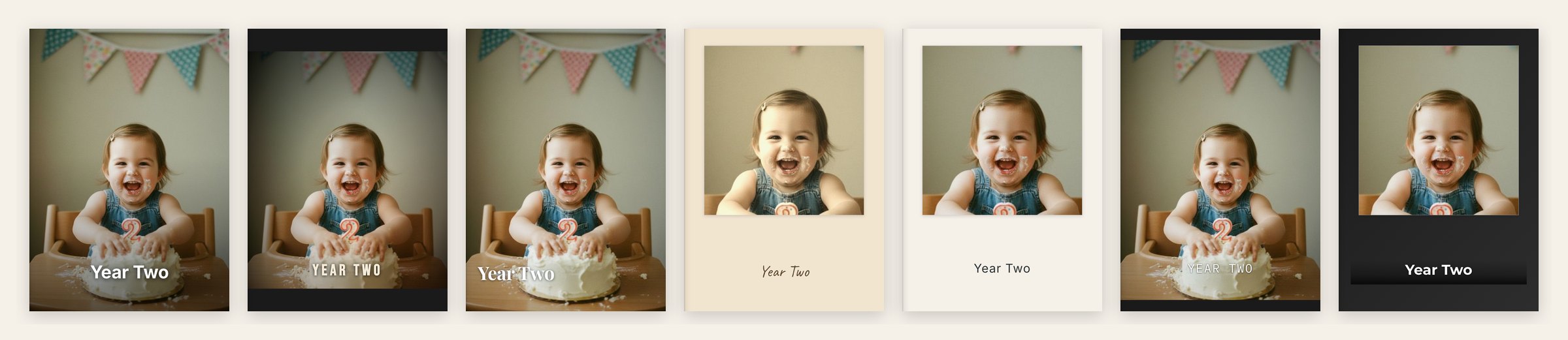
Your title stays yours
A style changes how the title looks — its font, colour, size and case — but not what it says or where you put it. Move it, and it stays there in every style.
On a light cover (Polaroid and Minimal) the title is dark; on a photo it is light, with a shadow, so it stays easy to read.
Long titles
Poster and Editorial make the title bigger. If yours runs to two lines, check that it still sits well inside the cover, or make the text box a little smaller.
Or ask the chat
You can also ask in words. Type Make the cover cinematic, Give it a magazine look or Something more minimal in the chat, and it applies the matching style.
Not sure which one you want? Ask it to suggest one for your photos.
What you see is what gets printed
The printed book and the PDF get exactly the cover you see in the editor, style included. Change the style and export again, and the new cover goes with it.
Frequently asked questions
Ready to try it?
Open your albumKeep reading
Editing your album: make every page yours
The AI gives you a finished draft — the editor is where you make it truly yours. Here’s everything you can change, panel by panel.
Using the AI chat: talk your album into shape
The fastest way to change your album is to ask. Here’s how to phrase requests so the AI Album Designer nails them the first time.
Print it, play it, keep it: everything you can make from your album
Press Export on any album. Order the printed book, watch it as a film, read it as a PDF, and find everything you made in one list, on the web, iPhone and Android.
Sustain
© 2026
·
Album ideas·
Compare·
AI agents·
Learn·
FAQ·
Connect your agent·
Terms·
Privacy·
Acceptable Use